 TulipSoft
 Building a network
Building a computer network
This section explains how to build a computer network.
What is a computer network?
Computer network 1 means コンピュータ同士の資源を共有するために作られたネットワーク. Computers communicate with each other using a common communication protocol through a digital interconnect. These interconnections consist of communication network technologies based on physically wired, optical, and radio frequency methods that can be arranged in a variety of network topologies.
What are we building it for?
There are many different purposes for configuring computer networks, but some of the most familiar ones are as follows.
- Connect two PCs and transfer files
- Place NAS and printers in the company and share them with employees.
- Upload smartphone images to the cloud
Use of large-scale commercial or consumer applications includes:
- Use a client-server type business system
- Use a cloud-based business system
What should I build?
When actually constructing a computer network, the content to be constructed will vary depending on the purpose for which it is constructed. Since multiple computers are on the network, a lot of work is required such as building the network, building the server, and installing the client.
Example: Home Internet connection environment
- Internet
- Internet connection terminal
- IP address settings (IP automatic assignment is convenient)
Example: In-company Internet connection environment + business system
- Internet
- ONU installation
- Router settings
- Set IP address range
- Registration of provider setting information -LAN
- Network hub installation
- MAC address confirmation
- LAN cable installation
- server
- Server computer installation
- Server application installation/configuration- Port settings
- IP address
- Must be fixed
- Client
- Client terminal installation
- Client application installation and settings
- IP address
- Automatic numbering is convenient, but depending on security requirements, you may want to fix it or specify a Mac address.
Business system system configuration
The system configuration of a business system falls under one of the following:
- Client/server type
- Cloud type
クライアント・サーバ型 is a distributed system consisting of multiple servers and multiple clients. Connection to the Internet is limited and is mainly used in systems built within a LAN.
クラウド型 is a centralized system. Assuming a constant Internet connection, the main functions of the system are managed by a single server from the client’s perspective, and consist of multiple clients. However, a decentralized system is actually being built behind the scenes from the client.
Building a client-server system
This section explains how to build a client/server system.
Set the server with a fixed IP
In a client/server system, set up the server with a fixed IP address. Because each client needs to know the server’s IP address.
Conversely, a client is a recipient of service within a network that does not need to be identified by other computers. Therefore, it is easier to manage IP addresses if you set them to be automatically assigned. However, if the installation site has a security policy, be sure to follow it.
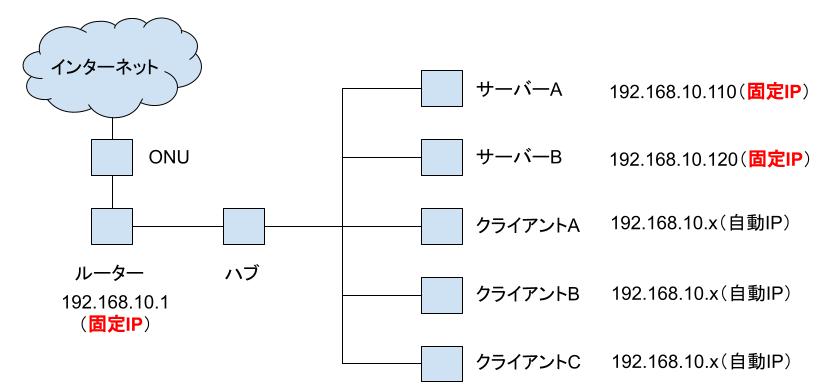
The following figure shows the configuration of a client/server system. Fixed IPs are specified for the router and server. The client is configured with automatic IP.
This allows client applications to communicate with the server by specifying the server’s IP and port. For example, if the DB server IP is fixed, clients can access the DB by specifying the IP and port.
Configuration image for a system consisting of two servers and multiple clients: